

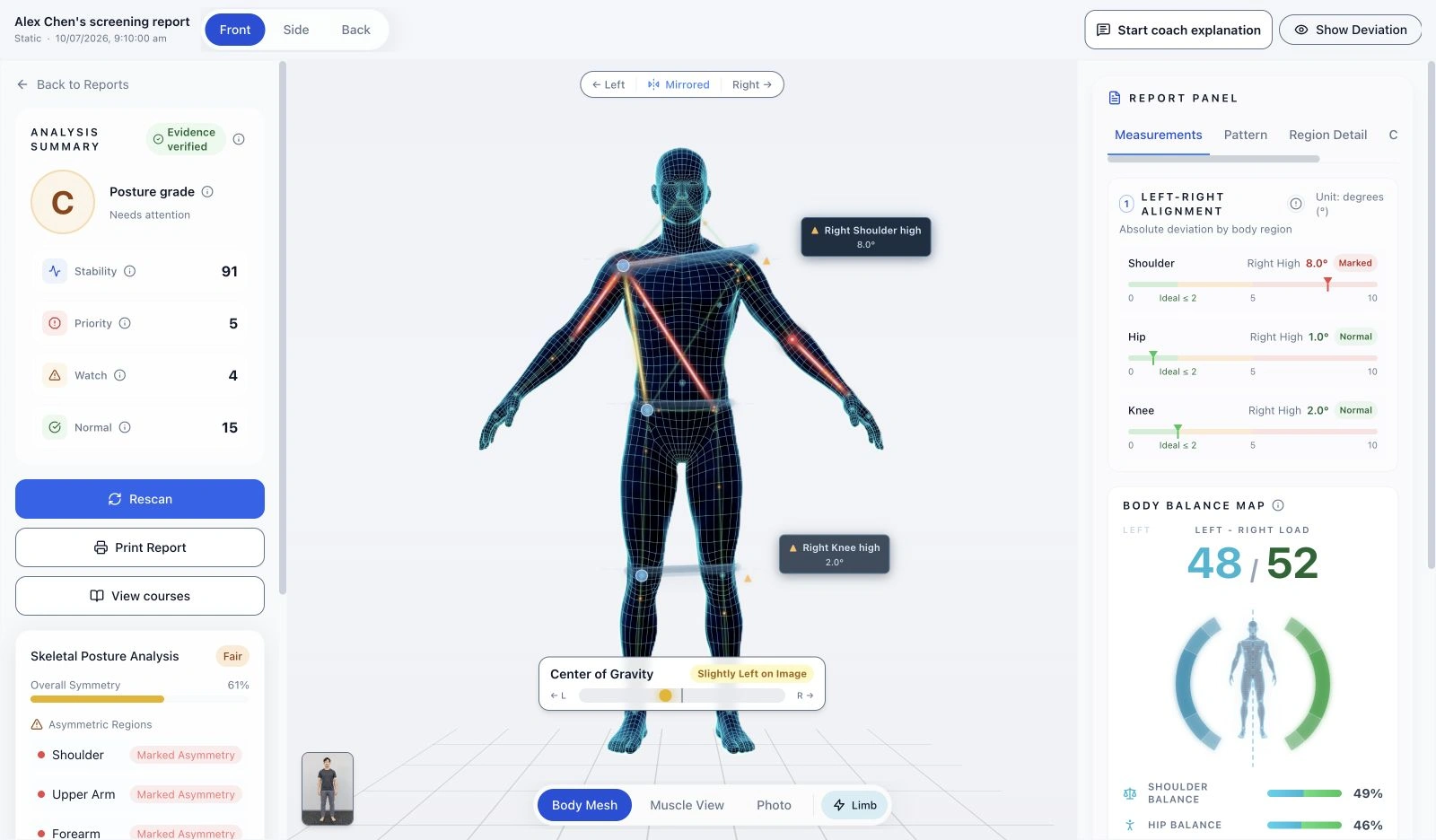
Static posture
Front, side and rear observations help coaches discuss body alignment with visual context.
THE PLATFORM
Give your team a visual starting point for a better conversation. Crosspoint X brings guided screening, understandable reports and member records into one workflow.
Crosspoint X เปลี่ยนการคัดกรองท่าทางและการเคลื่อนไหว ให้เป็นบทสนทนาที่สมาชิกมองเห็นได้
จัดพื้นที่ประเมินหนึ่งจุด: จอแสดงผลแบบติดผนัง เว็บแคมทั่วไปติดบนจอ หรือตำแหน่งใดก็ได้ที่สะดวก และพื้นที่ว่างบนพื้น เพื่อให้เห็นทั้งตัว
ทั้งหมดทำงานบนอุปกรณ์ที่คุณจัดเตรียมเอง
โค้ชเริ่มจากท่ายืน ทั้งด้านหน้าและด้านข้าง
จากนั้นทำโอเวอร์เฮดสควอตช้า ๆ หนึ่งครั้ง โดยหันหน้าเข้าหากล้อง หน้าจอจะแนะนำสมาชิก และติดตามการเคลื่อนไหวไปพร้อมกัน
และอีกหนึ่งครั้งจากด้านข้าง แต่ละมุมบันทึกการทำท่าที่สมบูรณ์หนึ่งครั้ง
รายงานจะเปิดบนหน้าจอเดียวกัน ให้โค้ชและสมาชิกอ่านไปด้วยกันได้
รายงานบอกว่าควรเริ่มดูจากตรงไหน
ตรงนี้ โค้ชเปิดข้อสังเกตจากภาพหนึ่งรายการ: ลำตัวเอนไปข้างหน้าระหว่างย่อตัวลง
โค้ชเทียบกับสิ่งที่เห็นจริงในพื้นที่ฝึก ถามว่าสมาชิกรู้สึกอย่างไร แล้วเลือกคำแนะนำหนึ่งข้อไปลองต่อ
รายงานท่าทางขณะยืนแสดงความแตกต่างซ้าย–ขวา บนภาพร่างกาย
ภาพกล้ามเนื้อช่วยให้สมาชิก เห็นว่าคุณหมายถึงบริเวณไหน เป็นการเปรียบเทียบส่วนของเส้นในภาพ ไม่ใช่ความแข็งแรงของกล้ามเนื้อ
AI ช่วยร่างประเด็นที่จะอธิบายได้ โค้ชตรวจทานและตัดสินใจเองว่าจะพูดอะไร
ในการเข้าพบครั้งถัดไป ทบทวนผลการประเมินครั้งก่อน และพูดคุยว่ามีอะไรเปลี่ยนไปบ้าง
Crosspoint X รับข้อมูลผลิตภัณฑ์ฉบับเต็ม หรือพูดคุยเรื่องการทดลองนำร่องในสถานที่ของคุณ
FROM CAPTURE TO CONVERSATION
Start with the member’s goals and the information relevant to the session. Explain the screening process before you begin.
Capture the supported static views or overhead squat movement. Check framing and capture quality as part of the workflow.
Use the visual observations and measurements to structure a coach-led conversation. An unavailable result is a reason to check the capture, not to fill in an answer.
Keep member and assessment records as a reference for later conversations and repeat screening. The team decides the appropriate follow-up.
WHAT YOU CAN EXPLORE
Front, side and rear observations help coaches discuss body alignment with visual context.
Supported front and side captures show movement observations across the squat. This is a defined assessment, not unrestricted analysis of every exercise.
View comparative observations alongside the original images, and explain them in the context of the member’s session.
Screening supports professional observation and discussion. It does not diagnose a condition or guarantee an injury prediction.
MAKE ROOM FOR THE EXPERIENCE
Use existing equipment that meets the recommended specifications, or ask us for hardware recommendations. Allow room for full-body framing, turning and movement.
Explore the 3D setupWe recommend an M1 MacBook Air or a higher-specification Mac, or a Windows computer with an RTX 3050 or higher GPU, with a screen for instructions and reports.
A standard webcam can be used. A wide-angle model is recommended to reduce the required capture distance. We can recommend hardware for your team to purchase.
Keep the background simple and avoid passing traffic or obstructions. Adjust positioning to the lens, member height and venue conditions.
IN DEVELOPMENT
We plan to expand movement assessments and AI assistance. Venue analytics are also a development direction and are not currently available.
YOUR NEXT STEP
Tell us about your venue, team and questions. We can help you understand the product and how screening could fit your workflow.