

Static posture
Front, side and rear observations help coaches discuss body alignment with visual context.
THE PLATFORM
Give your team a visual starting point for a better conversation. Crosspoint X brings guided screening, understandable reports and member records into one workflow.
Crosspoint X turns a posture and movement screening into a conversation your members can see.
Set up one assessment zone: a wall-mounted display, a standard webcam on the screen or wherever is convenient, and clear floor space for a full-body view.
It all runs on equipment you provide.
The coach starts with standing posture, from the front and the side.
Then one slow overhead squat, facing the camera. The screen guides the member and tracks the movement as it happens.
And one more from the side. Each view records a single, complete rep.
The report opens on the same screen, so coach and member can read it together.
It shows where to look first.
Here, the coach opens one image observation: the trunk leaning forward on the way down.
They compare it with what they saw on the floor, ask how it felt, and choose one cue to try next.
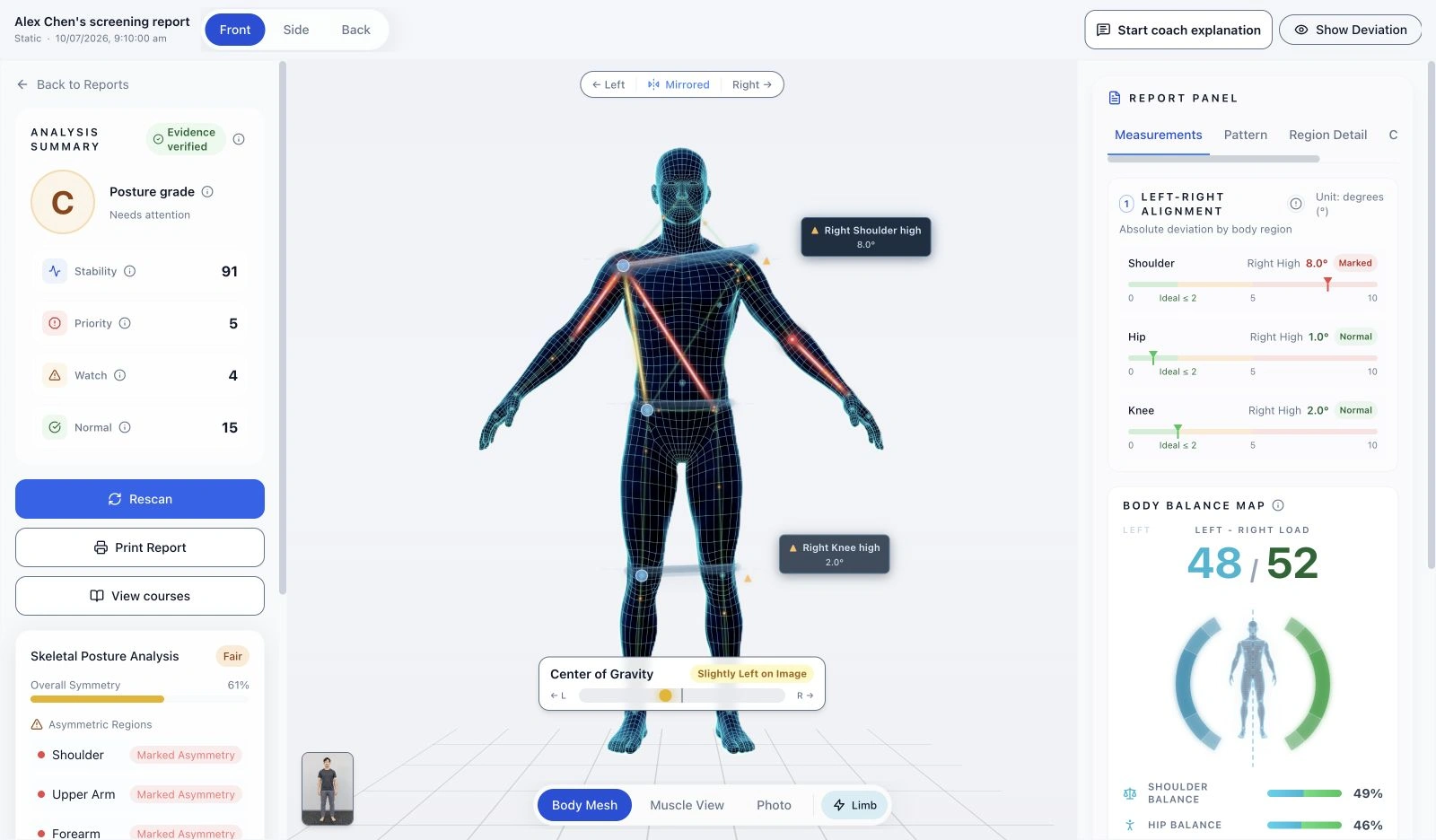
The standing posture report maps left–right differences onto the body.
The muscle view helps members see which regions you mean. It compares image segments, not muscle strength.
AI can help draft talking points. The coach reviews them and decides what to say.
At the next visit, review the previous assessment and talk about what has changed.
Crosspoint X. Get the full product overview, or discuss a pilot for your venue.
FROM CAPTURE TO CONVERSATION
Start with the member’s goals and the information relevant to the session. Explain the screening process before you begin.
Capture the supported static views or overhead squat movement. Check framing and capture quality as part of the workflow.
Use the visual observations and measurements to structure a coach-led conversation. An unavailable result is a reason to check the capture, not to fill in an answer.
Keep member and assessment records as a reference for later conversations and repeat screening. The team decides the appropriate follow-up.
WHAT YOU CAN EXPLORE
Front, side and rear observations help coaches discuss body alignment with visual context.
Supported front and side captures show movement observations across the squat. This is a defined assessment, not unrestricted analysis of every exercise.
View comparative observations alongside the original images, and explain them in the context of the member’s session.
Screening supports professional observation and discussion. It does not diagnose a condition or guarantee an injury prediction.
MAKE ROOM FOR THE EXPERIENCE
Use existing equipment that meets the recommended specifications, or ask us for hardware recommendations. Allow room for full-body framing, turning and movement.
Explore the 3D setupWe recommend an M1 MacBook Air or a higher-specification Mac, or a Windows computer with an RTX 3050 or higher GPU, with a screen for instructions and reports.
A standard webcam can be used. A wide-angle model is recommended to reduce the required capture distance. We can recommend hardware for your team to purchase.
Keep the background simple and avoid passing traffic or obstructions. Adjust positioning to the lens, member height and venue conditions.
IN DEVELOPMENT
We plan to expand movement assessments and AI assistance. Venue analytics are also a development direction and are not currently available.
YOUR NEXT STEP
Tell us about your venue, team and questions. We can help you understand the product and how screening could fit your workflow.